Every song. Within reach.
Keep your songs and lyrics together. Find the right title when the room calls for it.

YOUR PERFORMANCE COMPANION
Your songs, lyrics, and setlists, ready for the moment the room turns to you.
40-day Android beta · Limited to 20 testers.
By personal invite. Your 40 days start when you create your account. The invite-enabled APK is being prepared; the current download is for existing users and cannot redeem invites yet.
Live lyrics / demo
The next noteThe room grows quiet.
Take a breath. BREATHE
Let the next note rise.
Try the lyric cue preview. No audio plays.
The practical things, taken care of.
So you can give the song your attention.
Keep your songs and lyrics together. Find the right title when the room calls for it.
Build ordered setlists for your events, with your notes ready before the first song.
Share your request QR. Guests browse your published songs and send requests to your inbox.
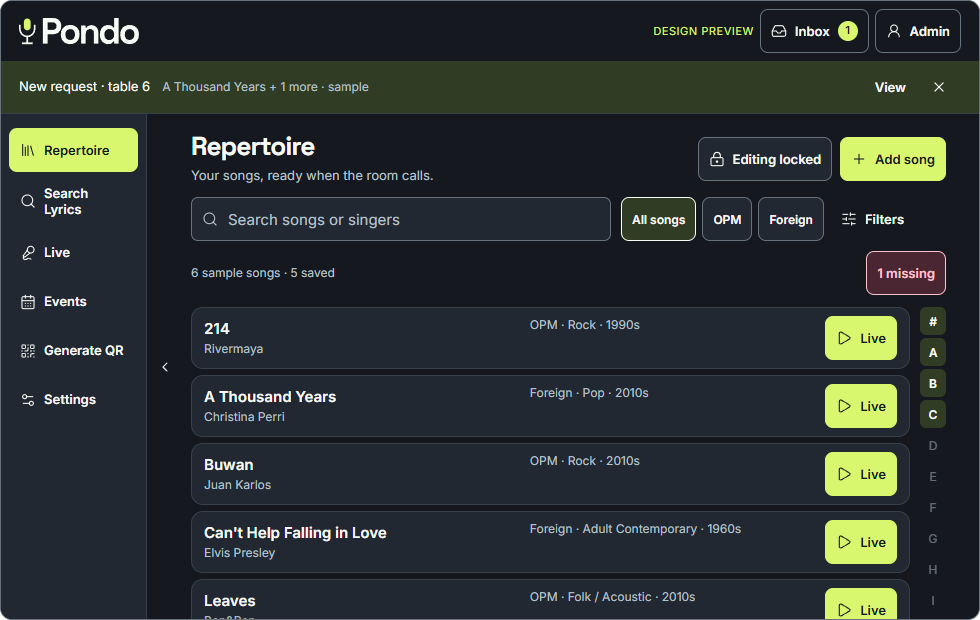
Familiar by day. Focused by night.
Find your songs, open their lyrics, and move into Live. Pondo’s light and dark appearances keep the same familiar layout.
Pondo app preview · sample repertoire
A few things to know
We’re inviting up to 20 testers to try Pondo on Android. Each tester receives an individual, one-use invite. Your own 40-day beta begins when you redeem it and create your account. After 40 days, beta features pause; your saved data stays intact and you can still export a backup. Share what works and what needs attention, and keep a backup of your repertoire.
The verified download is currently for Android. Apple support will be considered after the current Android updates. The Apple guide explains the current status and conditional web-app setup.
Install the latest Pondo APK over your existing app. Do not uninstall Pondo or clear its storage. Keep a current backup of your repertoire.
Guest request pages show the song details you choose to publish. Your private lyrics, event notes, and setlists are not shown there.
Saved MP3 files stay on the Android device where you saved them. They are separate from your song backup and account library sync.
Take your songs with you
Get Pondo on Android.
Find the right setup for your device.
The invite-enabled Android beta is being prepared for invited testers. The current download is the existing build and cannot redeem invitations yet. Existing users may download it to update; new testers should wait for the updated beta APK.
Already using Pondo? Install over the existing app to keep your songs. Do not uninstall or clear app storage.
Apple support comes later. We’re focusing on the Android beta first. An iPhone/iPad release or full Pondo web-app link is not available yet. The Android download cannot be installed on Apple devices.
If a compatible Pondo web app becomes available, this is how to add it to your Home Screen:
These are web-app setup steps, not an App Store download. Pondo’s Apple features need separate verification.
Apple’s iPhone instructions · iPad instructions